
How to Integrate FreshBooks with monday.com (Step-by-Step Guide)
If your finance team works in FreshBooks and your delivery team works in monday.com, the numbers and the work live in two places. Expenses get logged twice, invoices are invisible to project managers, and new clients wait on a manual handoff. This guide covers how to connect the two platforms, what you can sync, and why the setup is simpler than it is for most accounting tools.
Why Integrate FreshBooks with monday.com?
FreshBooks handles invoicing, expenses, and client billing. monday.com handles the work those numbers describe. Without a connection between them, you get:
- Expenses recorded in accounting but invisible on project boards
- Project managers who cannot see what has been billed
- New clients waiting on a manual handoff before work starts
- Budget tracking that depends on someone exporting a report
With an integration, you can:
- Reflect expenses on boards as they are logged, so budgets stay current
- Surface invoices where delivery teams already work
- Start work automatically when a new client or project is created
- Create FreshBooks records from monday.com when work moves forward
Integration Methods (Compared)
FreshBooks is a useful case, because the options are narrower than they are for most tools.
1. Manual Entry
- ✓ No setup required
- ✗ Duplicated effort on every record
- ✗ Data drifts out of date between updates
- · Workable only at very low volume
2. Third-Party Tools (Zapier, Make)
- ✓ Connects the two platforms
- ✗ Task-based pricing that grows with invoice and expense volume
- ✗ A third account to administer and pay for
- ✗ Financial data passes through an extra system
3. FreshBooks Integration the only native option
- ✓ The only native monday.com integration for FreshBooks
- ✓ No middleware account to buy or maintain
- ✓ Covers clients, estimates, projects, invoices, and expenses
- ✓ Works in both directions with dynamic field mapping
This is the recommended approach.
Every other route between FreshBooks and monday.com goes through a general-purpose automation tool. That is the practical difference: with a native app there is no third platform sitting between your accounting records and your boards.
What You Can Sync
Five FreshBooks record types are supported, in both directions:
| FreshBooks Record | Typical monday.com Use |
|---|---|
| Client | Create an onboarding item on an accounts board |
| Estimate | Track proposals awaiting approval |
| Project | Open a delivery board item when work is sold |
| Invoice | Show what has been billed and what is outstanding |
| Expense | Track project costs against budget in real time |
Step-by-Step: Connect FreshBooks to monday.com
You need a monday.com account and a FreshBooks account. The whole setup takes about ten minutes.
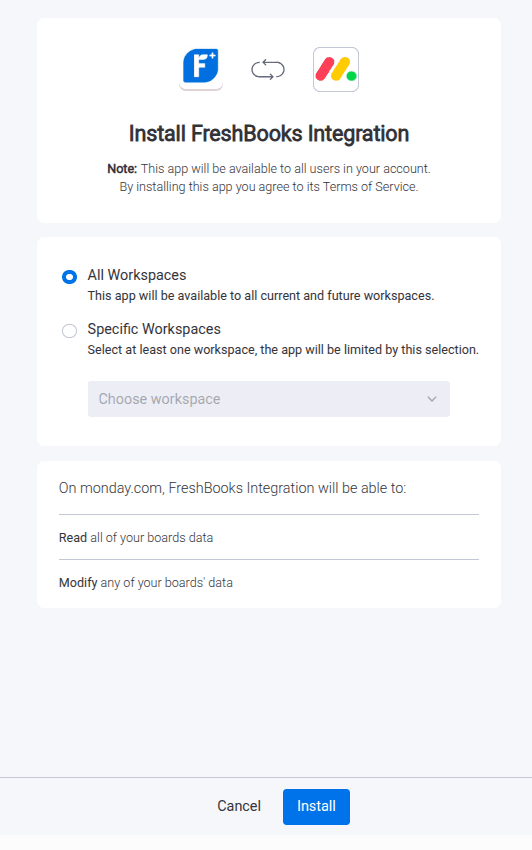
1Install the Integration App
- Go to the monday.com Marketplace
- Search for “FreshBooks Integration”
- Install the app
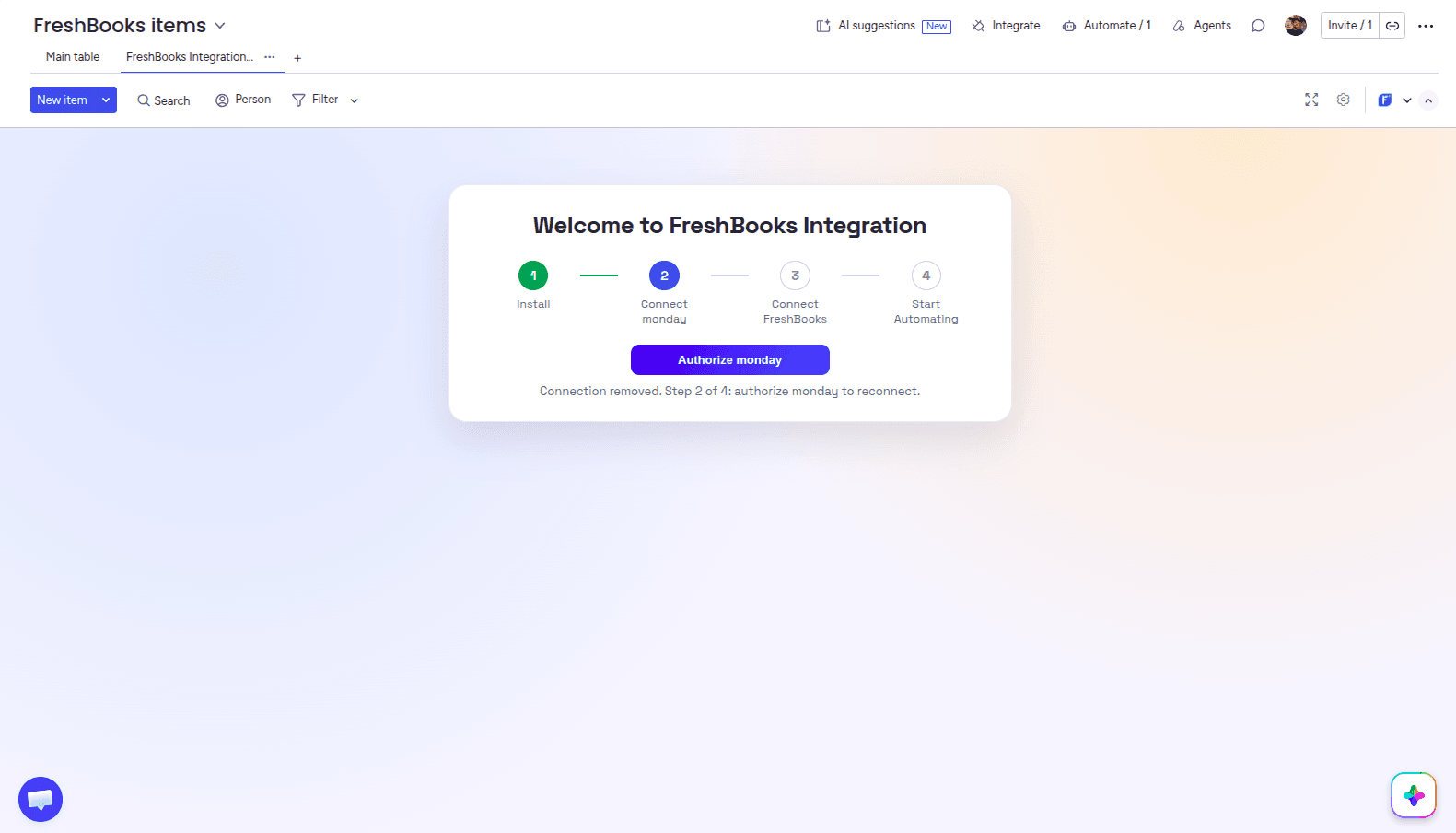
2Authorize monday.com
After installing, you land on the Admin UI. Click Authorize monday to open the authorization pop-up, confirm, and you are returned to the Admin UI.
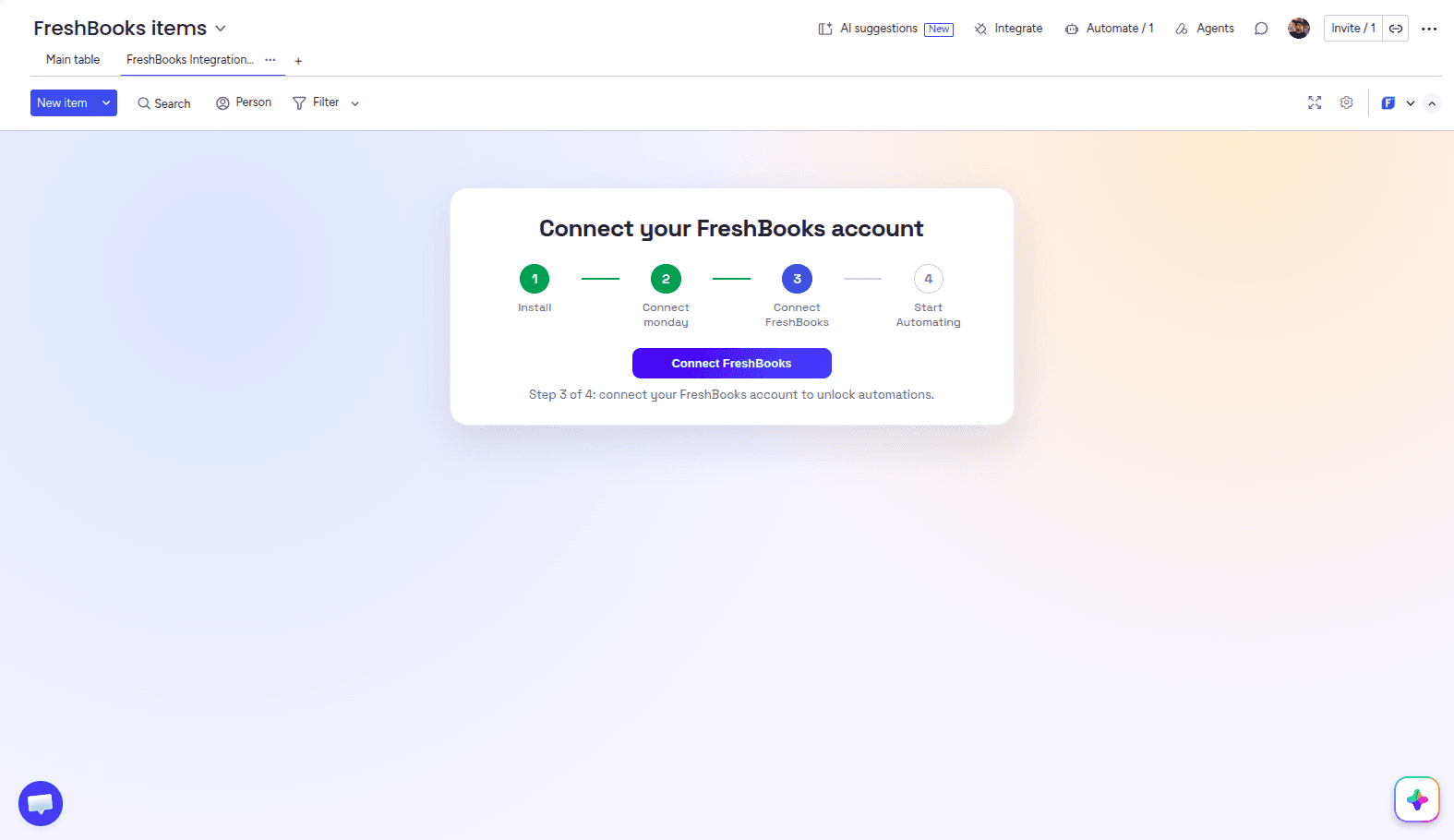
3Connect Your FreshBooks Account
Click Connect FreshBooks to open the FreshBooks authorization page. Once you approve access, you are redirected back to the Admin UI, where you can see your connections, plan usage, and automation history.
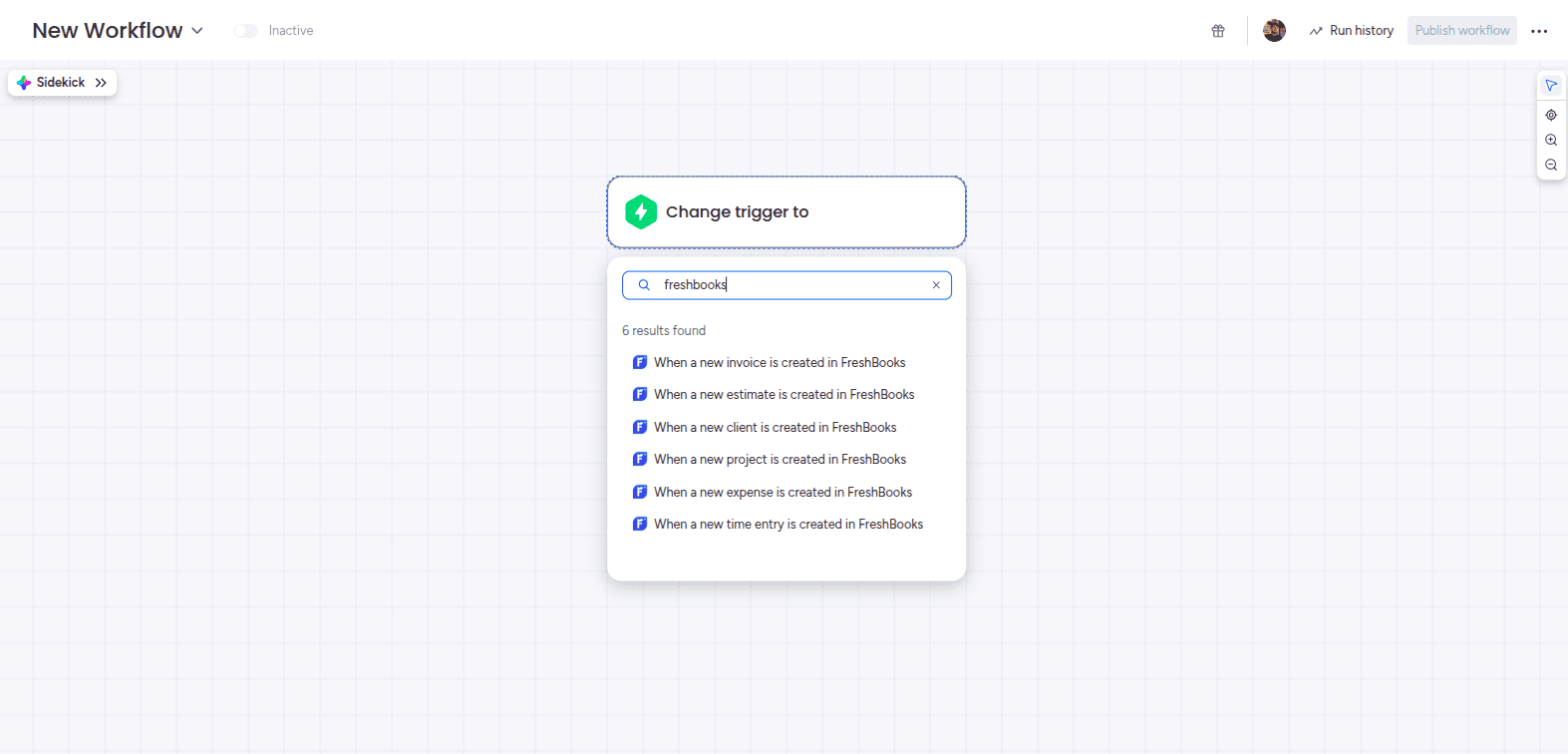
4Add a FreshBooks Trigger
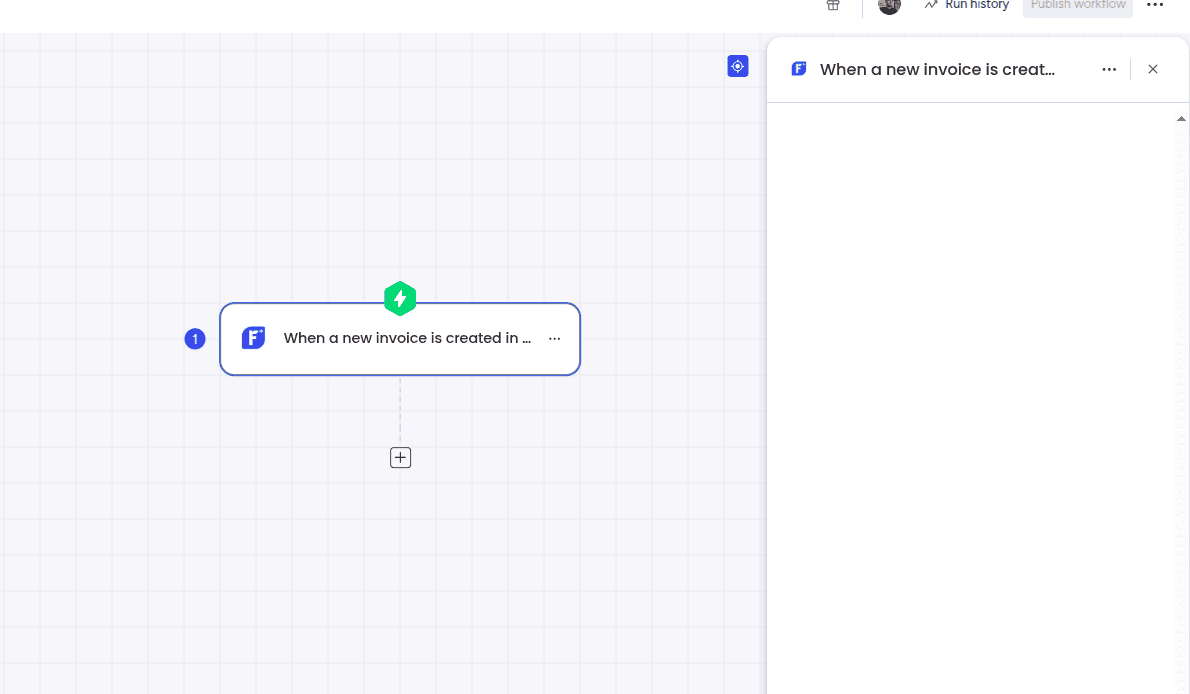
Start a new workflow and search the Triggers section for FreshBooks. Pick the record type you want to watch — for example, when a new invoice is created. No extra configuration is needed on the trigger itself.
5Add an Action
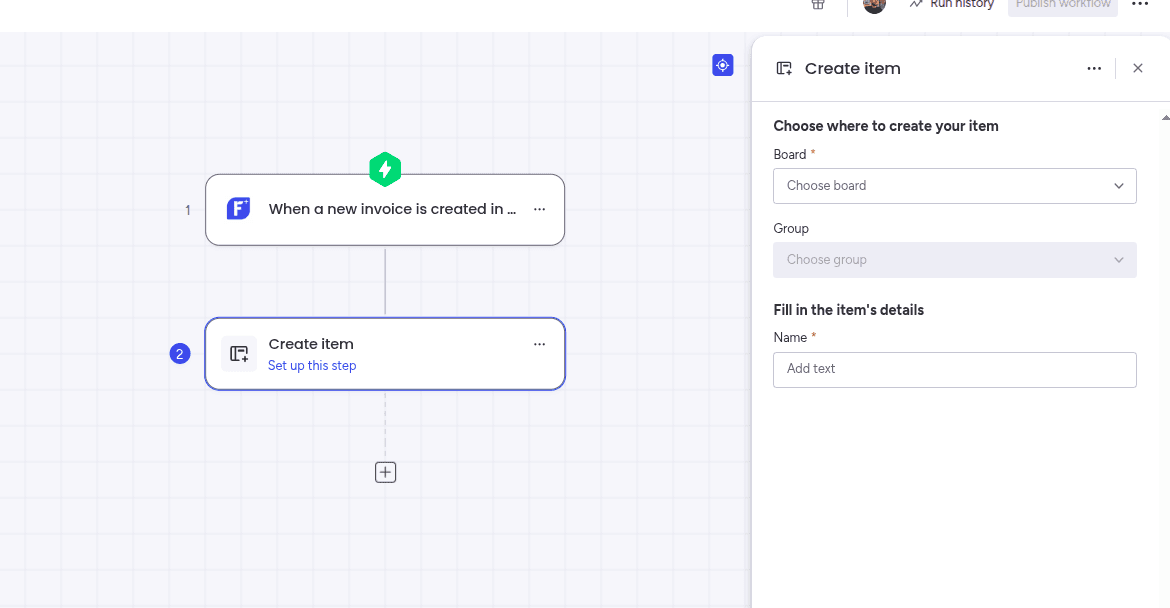
Search the Actions section for the action you want — commonly “Create item” — then choose the board it should write to.
6Map Fields Between Platforms
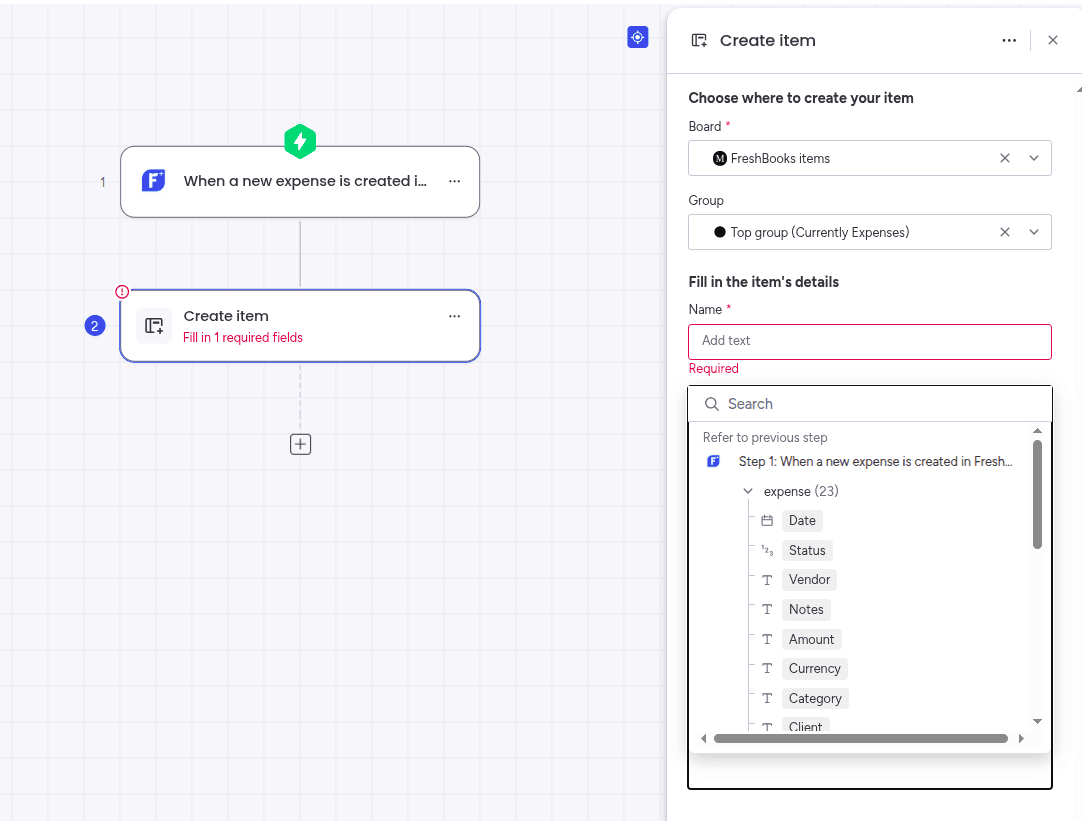
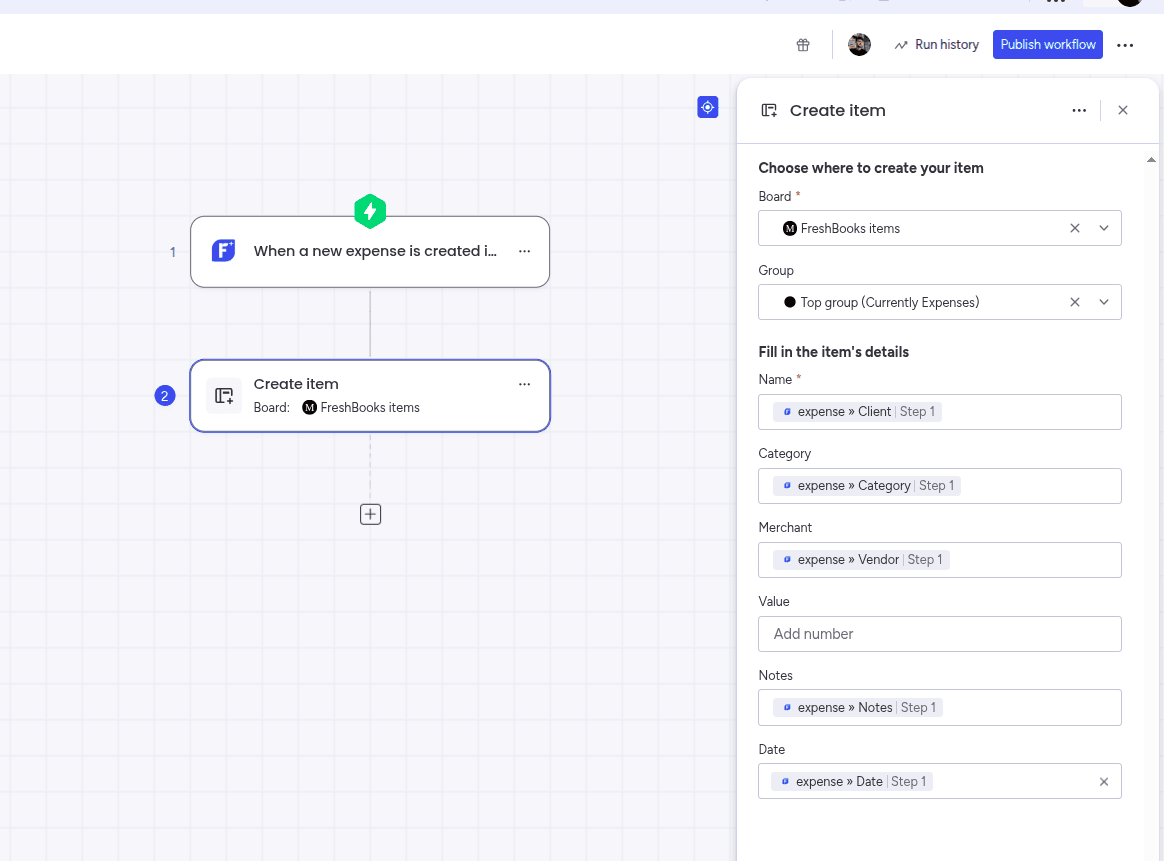
Map your board columns to FreshBooks fields. These values populate each item the automation creates.
Example mappings:
| FreshBooks Field | monday.com Column |
|---|---|
| Invoice number | Name column |
| Amount | Numbers column |
| Client | Text or Connect boards column |
| Status | Status column |
| Due date | Date column |
7Test the Integration
- Create a test expense or draft invoice in FreshBooks
- Confirm the item appears on your monday.com board
- Check that each mapped column holds the value you expect
Run this against a test board before pointing the automation at live client work.
The full walkthrough, including the board Automations route as well as workflows, is in the FreshBooks Integration setup guide.
Common Use Cases
Expense Management
Log an expense in FreshBooks and see it on the project board, so budgets and project costs stay current without a monthly export.
Invoice Visibility
Sync invoices onto boards so project managers know what has been billed and what is still outstanding.
Client & Project Handoff
When a new FreshBooks client or project is created, open the onboarding or delivery work automatically.
Billing From Delivery
When a board item reaches a completed status, create the matching FreshBooks record so billing follows the work.
Why Not Just Use Zapier?
Zapier and Make both connect FreshBooks to monday.com, and for a handful of records a month they are perfectly reasonable. The trade-offs show up as volume grows:
- Pricing is task-based, and every invoice and expense is a task
- You maintain and pay for a third platform
- Financial records travel through an extra system
- Debugging spans three tools instead of one
Because FreshBooks Integration runs inside monday.com, the automation is configured in the same place as the rest of your board automations, and there is no per-task meter on it.
Where the Integration Runs
FreshBooks Integration is hosted natively on monday code, monday.com’s own application infrastructure. In practice that means:
- No external servers are involved in running the integration
- Your data stays inside monday.com’s infrastructure
- The app inherits monday.com’s security and compliance posture
This matters more for accounting data than for most integrations, since invoices and expenses carry client and financial detail.
Best Practices
To get the most out of your FreshBooks–monday.com integration:
- Start with one record type, usually expenses or invoices
- Sync only the fields your delivery team acts on
- Keep a dedicated finance board rather than mixing records into delivery boards
- Use consistent status naming across both platforms
- Test on a sandbox board before automating live client work
Frequently Asked Questions
Does FreshBooks integrate with monday.com?
Yes. FreshBooks Integration is the only native monday.com integration for FreshBooks. It is installed from the monday.com Marketplace and runs inside monday.com, so no middleware is involved.
Do I need Zapier to connect FreshBooks and monday.com?
No. Every other way of connecting the two platforms routes through a general-purpose automation tool such as Zapier or Make. FreshBooks Integration connects them directly.
What FreshBooks records can I sync?
Clients, estimates, projects, invoices, and expenses. Each one can trigger an automation in monday.com, and monday.com boards can create FreshBooks records in return.
Does it work in both directions?
Yes. You can create monday.com items from new FreshBooks records, and create FreshBooks records from monday.com boards when work moves forward.
Can I sync invoices into monday.com automatically?
Yes. A new invoice in FreshBooks can automatically create an item on a monday.com board, so project managers can see what has been billed without opening the accounting tool.
Where is my data processed?
The app is hosted natively on monday code, monday.com's own application infrastructure. No external servers are involved in running the integration.
Final Thoughts
Pick the one record type that currently costs your team the most re-typing — for most teams that is expenses — and automate it first. Once that is running cleanly against a test board, add the remaining record types one at a time.
Explore More monday.com Integration Guides
Need to connect other tools with monday.com? Check out our related guides:
Ready to connect FreshBooks and monday.com?
Install FreshBooks Integration from the monday.com Marketplace and keep finance and delivery working from the same records.
Install FreshBooks Integration