
How to Integrate GoHighLevel with monday.com (Step-by-Step Guide)
GoHighLevel wins the client. monday.com is usually where the work that follows actually happens — onboarding, delivery, fulfilment, reporting. This guide covers how to connect the two platforms, which GHL records you can bring across, and why the setup is shorter than it is for most CRMs.
Why Integrate GoHighLevel with monday.com?
GoHighLevel is where marketing and sales activity lives: Contacts, Opportunities, Tasks, Invoices. monday.com is where a lot of teams run everything that happens after the deal. When the two are not connected, you get:
- New clients who sit in the CRM for days before delivery hears about them
- Fulfilment tracked in a spreadsheet beside the pipeline it came from
- Account managers re-typing the same contact details into a board
- Delivery staff given CRM seats purely so they can read a few fields
With an integration, you can:
- Start onboarding automatically the moment a new Contact or Opportunity is created
- Trigger monday.com automations from CRM events, using the notification and escalation rules you already have
- Report across sales and delivery on one dashboard, combining customer and operational data
- Keep working in GoHighLevel while visibility travels outward to everyone else
Integration Methods (Compared)
There are three realistic routes between GoHighLevel and monday.com:
1. Manual Entry
- ✓ No setup required
- ✗ Someone owns a recurring copy-paste job
- ✗ Handoffs wait on whoever is watching the pipeline
- · Falls apart once you run several clients at once
2. Zapier, Make, or a Custom Webhook
- ✓ Connects the two platforms
- ✗ Task-based pricing that grows with lead volume
- ✗ A third account to administer and pay for
- ✗ A custom webhook means an endpoint you have to host and maintain
3. GoHighLevel Integration the only native option
- ✓ The only native monday.com integration for GoHighLevel
- ✓ No middleware account to buy or maintain
- ✓ Covers Contacts, Opportunities, Tasks, and Invoices
- ✓ Configured alongside your other monday.com automations
This is the recommended approach.
Every other route between GoHighLevel and monday.com goes through a general-purpose automation tool or code you write yourself. That is the practical difference: with a native app there is no third platform sitting between your CRM and your boards.
What You Can Sync
Four GoHighLevel record types can trigger a monday.com automation. Each one creates an item on the board you choose:
| GoHighLevel Record | Typical monday.com Use |
|---|---|
| Contact | Open an onboarding item as each new lead enters the CRM |
| Opportunity | Track deals through the pipeline alongside delivery capacity |
| Task | Organize customer tasks next to internal work on one board |
| Invoice | Keep billing activity visible to operations and finance |
The flow runs from GoHighLevel into monday.com. Your sales and marketing team carries on working in GHL, and monday.com becomes the place where everyone else can see and act on what they do.
Step-by-Step: Connect GoHighLevel to monday.com
You need a monday.com account and a GoHighLevel account. The whole setup takes about ten minutes.
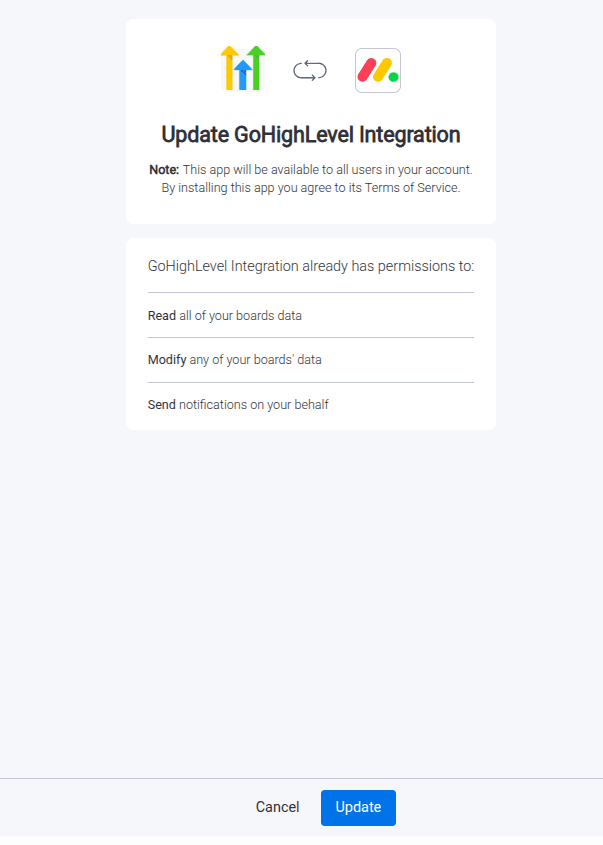
1Install the Integration App
- Go to the monday.com Marketplace
- Search for “GoHighLevel Integration”
- Install the app
2Authorize monday.com
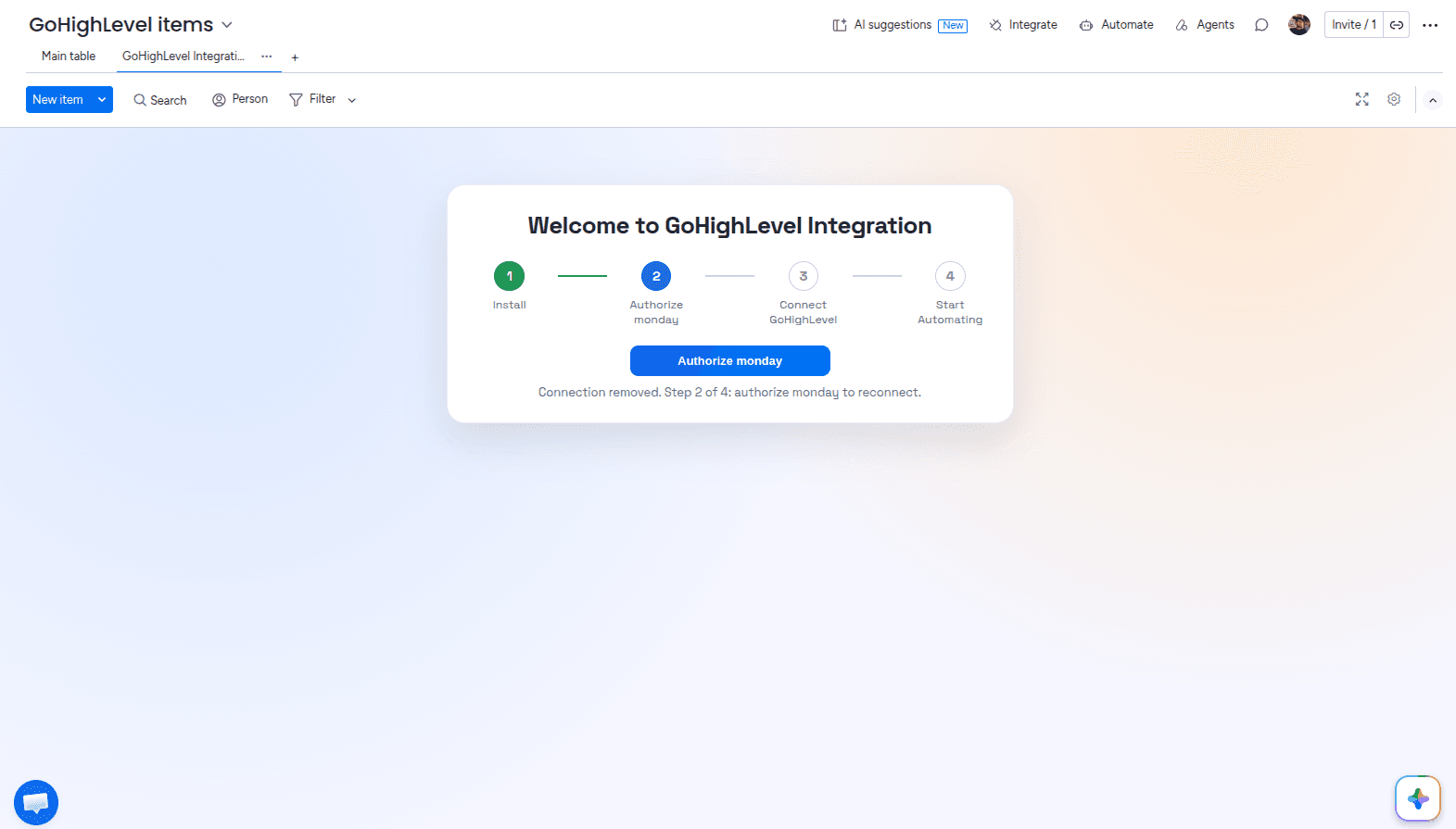
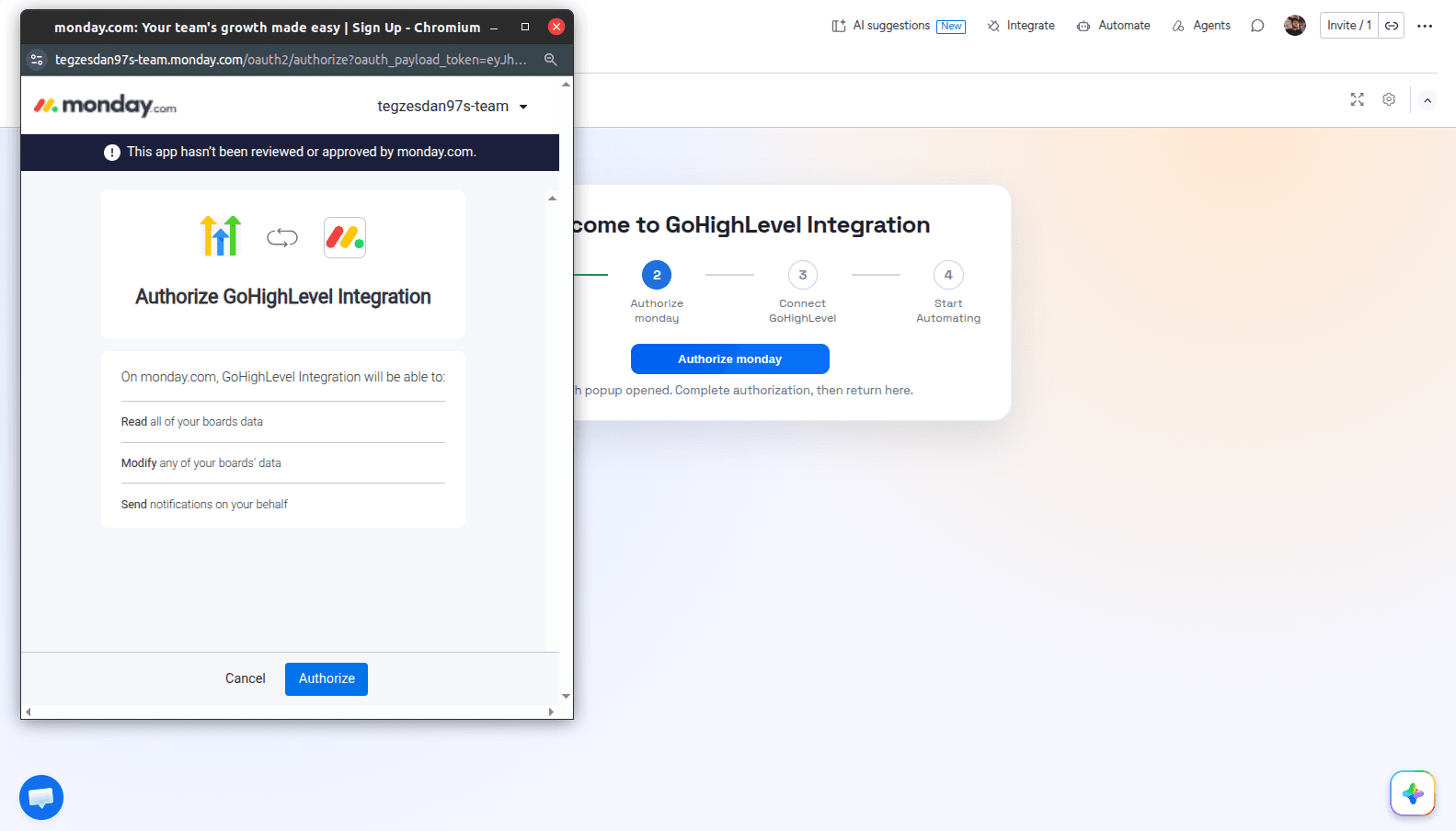
After installing, you land on the Admin UI. Click Authorize monday to open the authorization pop-up, confirm, and you are returned to the Admin UI.
3Connect Your GoHighLevel Account
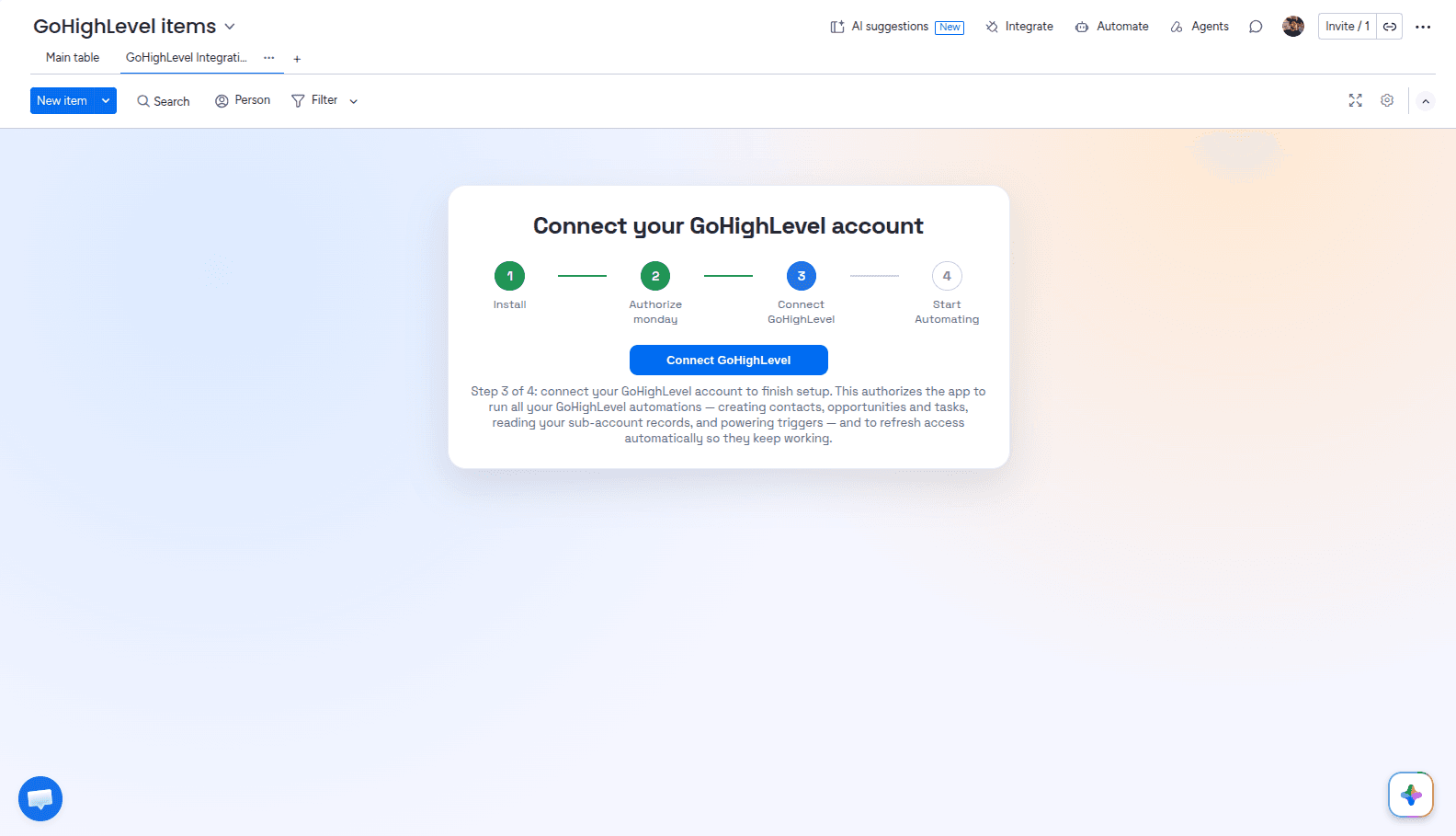
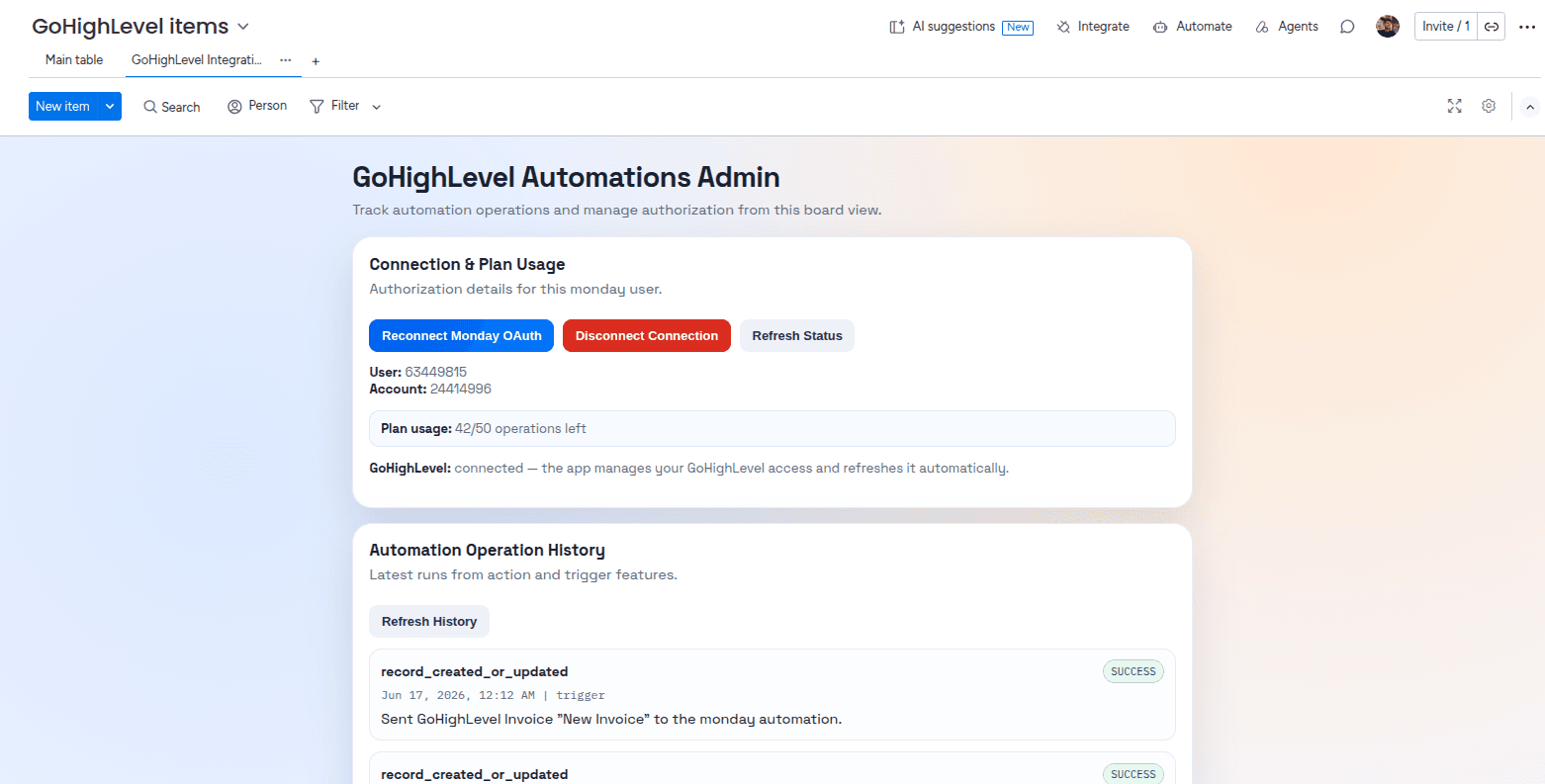
Click Connect GoHighLevel to open the GoHighLevel authorization page. Once you approve access, you are redirected back to the Admin UI, where you can see your connections, plan usage, and automation operations history.
4Add a GoHighLevel Trigger
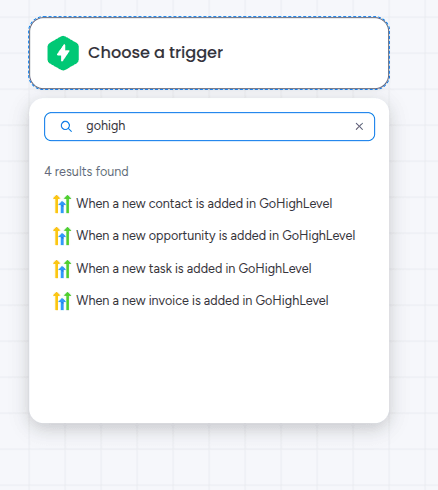
Start a new workflow and search the Triggers section for GoHighLevel. Pick the record type you want to watch — for example, when a new Opportunity is created. No extra configuration is needed on the trigger itself.
5Add an Action
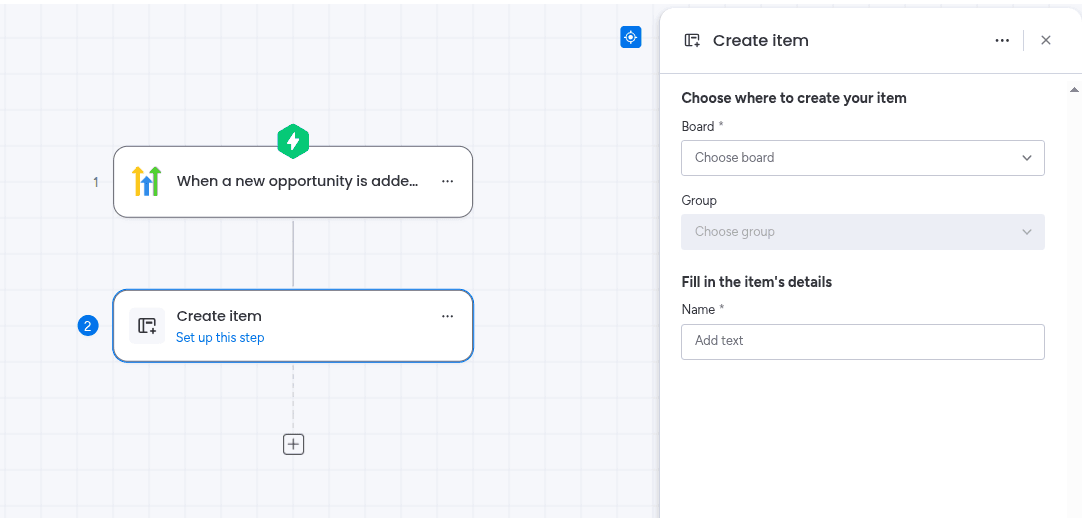
Search the Actions section for the action you want — commonly “Create item” — then choose the board it should write to.
6Map Fields Between Platforms
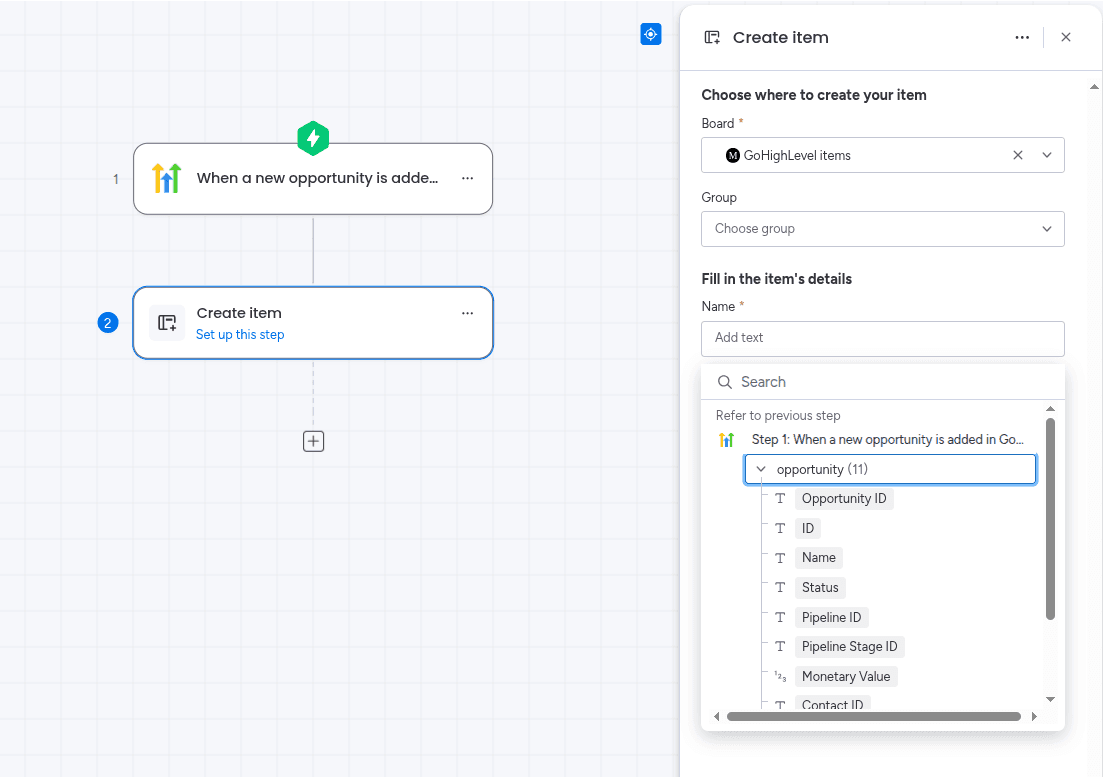
Map your board columns to GoHighLevel fields. These values populate each item the automation creates.
Example mappings for an Opportunity board:
| GoHighLevel Field | monday.com Column |
|---|---|
| Opportunity name | Name column |
| Contact name | Text column |
| Email column | |
| Pipeline stage | Status column |
| Value | Numbers column |
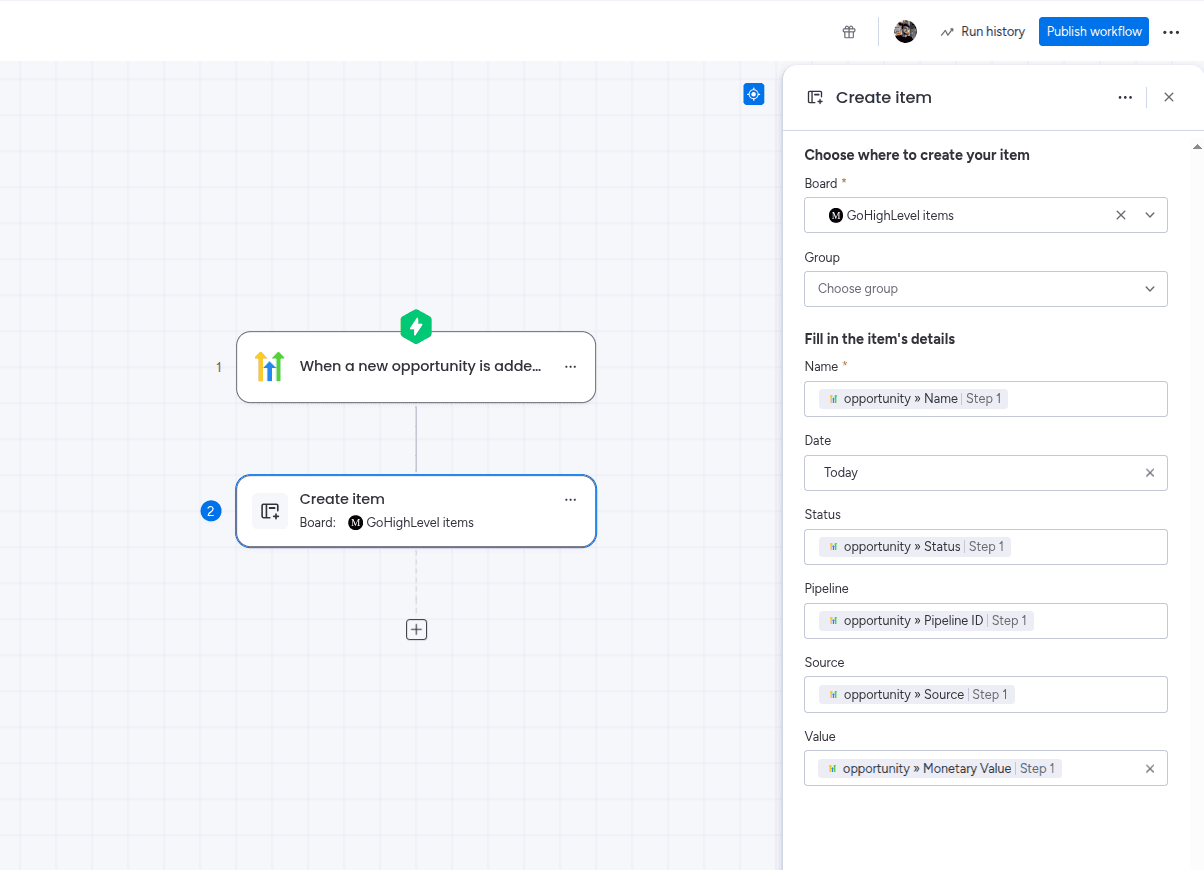
When the mapping is done, click Publish workflow to activate it.
7Test the Integration
- Create a test Contact or Opportunity in GoHighLevel
- Confirm the item appears on your monday.com board
- Check that each mapped column holds the value you expect
Run this against a test board before pointing the automation at live client work.
Building the Same Automation From a Board
Workflows are not the only route. You can build the same thing from a board’s Automations section, which is often more convenient when the automation only ever concerns that one board. Open Automate on the board, create an automation from scratch, then add the GoHighLevel trigger and action.
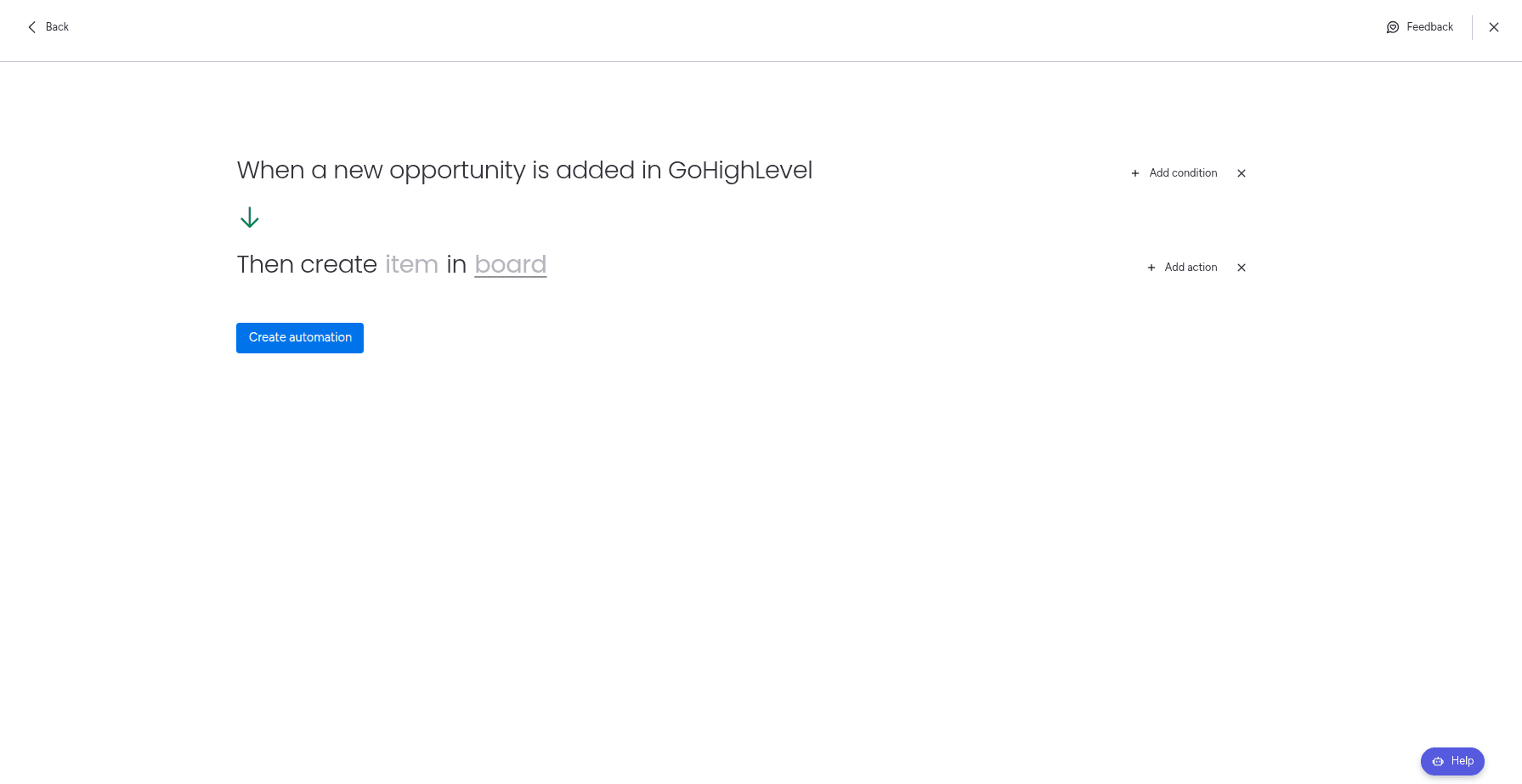
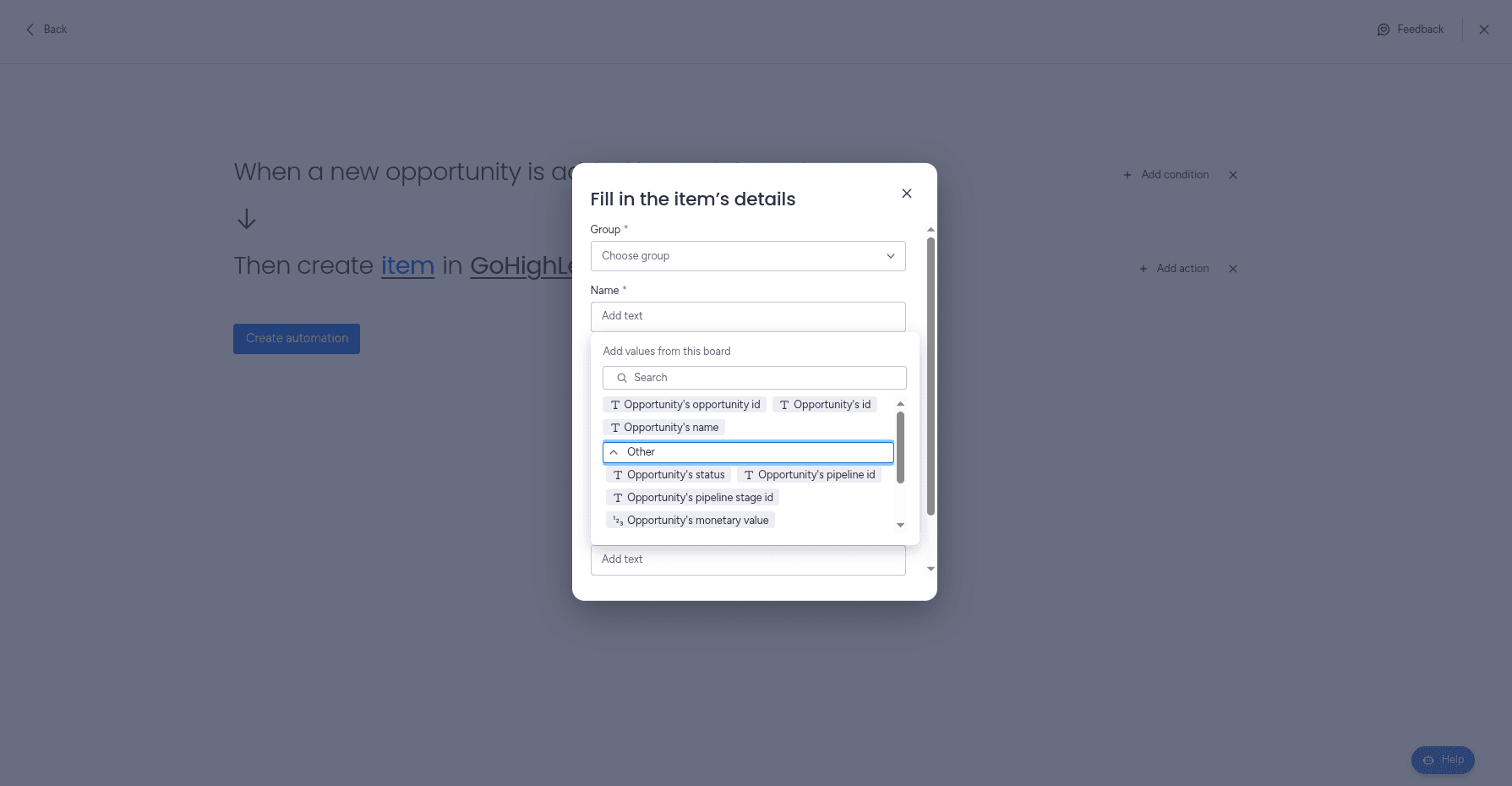
The field mapping works exactly as it does in a workflow. Click Create automation when you are done. The full walkthrough of both routes is in the GoHighLevel Integration setup guide.
Common Use Cases
Lead to Onboarding
Every new Contact opens an onboarding item, so delivery starts without waiting on a handoff message.
Pipeline Visibility
New Opportunities land on a board where operations can see what is about to be sold and plan capacity for it.
Client Tasks Beside Internal Work
GoHighLevel Tasks appear next to the rest of the team's work instead of living in a separate tool.
Billing Visibility
Invoice activity reaches operations and finance without anyone needing a CRM seat to check it.
This matters most for agencies. If you run several clients out of one GoHighLevel account, each new Opportunity becomes an ordinary monday.com item, which means everything downstream is ordinary monday.com too: dashboards combining sales and delivery, automatic assignment to an account manager, escalation when an item sits too long, and reporting for clients who will never log into your CRM.
Why Not Just Use Zapier?
Zapier and Make can both connect GoHighLevel to monday.com, and for a handful of records a month they work fine. The trade-offs show up as lead volume grows:
- Pricing is task-based, and every Contact and Opportunity is a task
- You maintain and pay for a third platform
- Customer data travels through an extra system
- Debugging spans three tools instead of one
The same applies to a custom GHL webhook, with the added cost of hosting and maintaining the endpoint yourself. Because GoHighLevel Integration runs inside monday.com, the automation is configured in the same place as the rest of your board automations, and there is no per-task meter on it.
Best Practices
To get the most out of your GoHighLevel–monday.com integration:
- Start with one record type, usually Opportunities, and add the others once it runs cleanly
- Sync only the fields your delivery team actually acts on
- Keep a dedicated CRM intake board rather than mixing records into delivery boards
- Match your monday.com status labels to your GoHighLevel pipeline stages
- Test on a sandbox board before automating live client work
Frequently Asked Questions
Does GoHighLevel integrate with monday.com?
Yes. GoHighLevel Integration is the only native monday.com integration for GoHighLevel. It is installed from the monday.com Marketplace and runs inside monday.com, so no middleware is involved.
Do I need Zapier to connect GoHighLevel and monday.com?
No. Every other way of connecting the two platforms routes through a general-purpose automation tool such as Zapier, Make, or a custom webhook setup. GoHighLevel Integration connects them directly.
What GoHighLevel records can I sync to monday.com?
Contacts, Opportunities, Tasks, and Invoices. When any of these is created in GoHighLevel, the integration can automatically create a matching item on the monday.com board you choose.
Does the integration sync back into GoHighLevel?
No. The integration brings GoHighLevel activity into monday.com so sales, delivery, and finance teams get visibility there. Your team continues to work in GoHighLevel as normal.
Can agencies use this across multiple sub-accounts?
You can build a separate automation per GoHighLevel account connection and point them at the same monday.com board, which gives you a cross-client view of new Opportunities or Contacts in one place.
Is this the same as a GHL webhook?
It covers the same need without the maintenance. A webhook requires you to build and host an endpoint that receives GoHighLevel events and calls the monday.com API. The integration is installed from the Marketplace and configured through the normal monday.com automation builder.
Final Thoughts
Pick the record type that currently causes the most re-typing — for most agencies that is new Opportunities — and automate that one first. Get it landing correctly on a test board, then add Contacts, Tasks, and Invoices one at a time.
Explore More monday.com Integration Guides
Need to connect other tools with monday.com? Check out our related guides:
Ready to connect GoHighLevel and monday.com?
Install GoHighLevel Integration from the monday.com Marketplace and keep sales, delivery, and finance working from the same records.
Install GoHighLevel Integration