
How to Integrate Instantly.ai with monday.com (Step-by-Step Guide)
Cold outreach is a speed game. A prospect who replies on Tuesday morning is worth far more than the same prospect on Thursday afternoon, and every hour that reply sits unnoticed in Instantly.ai is an hour of lost intent. This guide covers how to connect Instantly.ai to monday.com, which campaign events you can act on, and why the setup differs slightly from most integrations.
Why Integrate Instantly.ai with monday.com?
Instantly.ai runs the campaigns. monday.com is usually where the pipeline those campaigns produce actually gets worked. When the two are not connected, you get:
- Replies that sit in a shared inbox until someone thinks to check it
- Booked meetings nobody has assigned to an account owner
- Interested leads re-typed into a board by hand, hours later
- Campaign performance that lives in a tool most of the team never opens
With an integration, you can:
- Cut time-to-response by turning a reply into an assigned board item the moment it lands
- Notify the right rep automatically when a meeting is booked
- Prioritize by intent, treating a reply differently from an open
- Report on outreach and pipeline together on one dashboard instead of two tools
Integration Methods (Compared)
There are three realistic routes between Instantly.ai and monday.com:
1. Manual Entry
- ✓ No setup required
- ✗ Response time depends on someone watching an inbox
- ✗ Warm replies go cold while they wait to be logged
- · Breaks down completely at outreach volume
2. Third-Party Tools (Zapier, Make)
- ✓ Connects the two platforms
- ✗ Task-based pricing, and outreach generates a lot of events
- ✗ A third account to administer and pay for
- ✗ Prospect data passes through an extra system
3. Instantly Integration the only native option
- ✓ The only native monday.com integration for Instantly.ai
- ✓ No middleware account to buy or maintain
- ✓ Covers six campaign events, from opens through to closed
- ✓ Configured alongside your other monday.com automations
This is the recommended approach.
Every other route between Instantly.ai and monday.com goes through a general-purpose automation tool. That matters more here than for most integrations: outreach produces high event volume, and task-metered pricing is exactly the wrong shape for it.
What You Can Sync
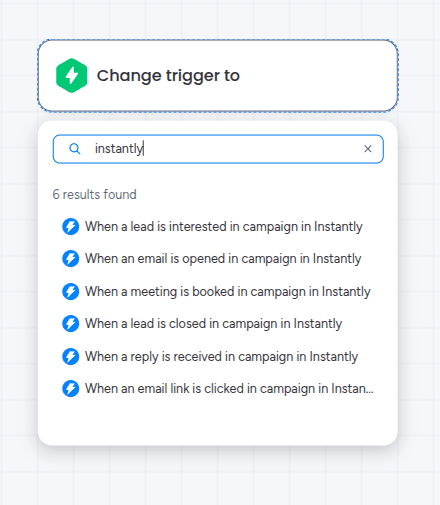
Instantly.ai triggers on campaign engagement rather than on records. Six events can start a monday.com automation, and each one creates an item on the board you choose:
| Instantly.ai Event | Typical monday.com Use |
|---|---|
| Lead marked interested | Add to a warm-leads board for same-day follow-up |
| Reply received | Create an assigned follow-up task straight away |
| Meeting booked | Notify the account owner and open a pre-call checklist |
| Email opened | Feed engagement reporting dashboards |
| Link clicked | Flag higher-intent prospects for prioritization |
| Lead marked closed | Close the loop on the board and update reporting |
The flow runs from Instantly.ai into monday.com. Your campaigns keep running in Instantly.ai, and monday.com becomes the place where the team acts on what those campaigns produce.
Step-by-Step: Connect Instantly.ai to monday.com
You need a monday.com account and an Instantly.ai account. The whole setup takes about ten minutes.
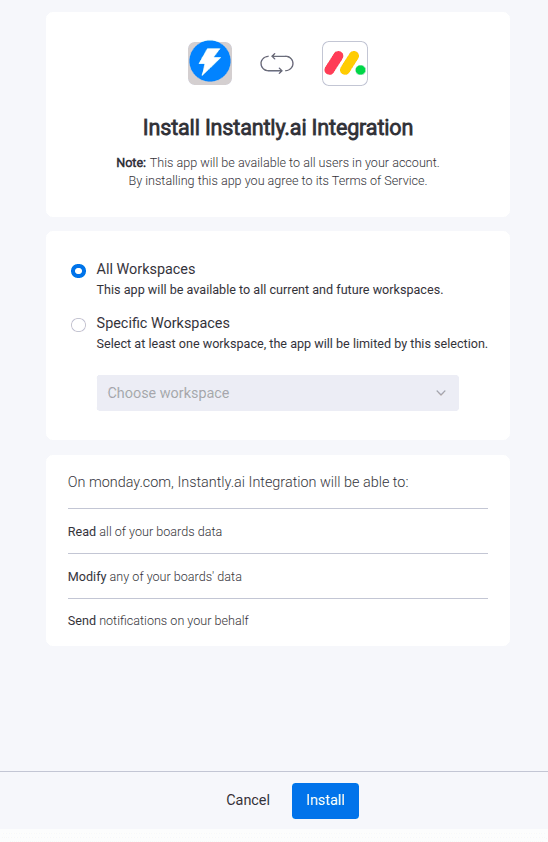
1Install the Integration App
- Go to the monday.com Marketplace
- Search for “Instantly Integration”
- Install the app
2Authorize monday.com
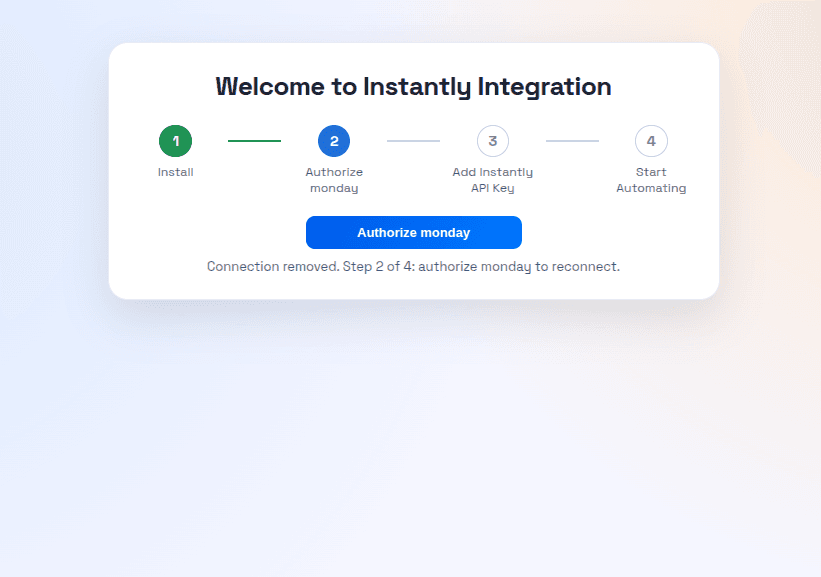
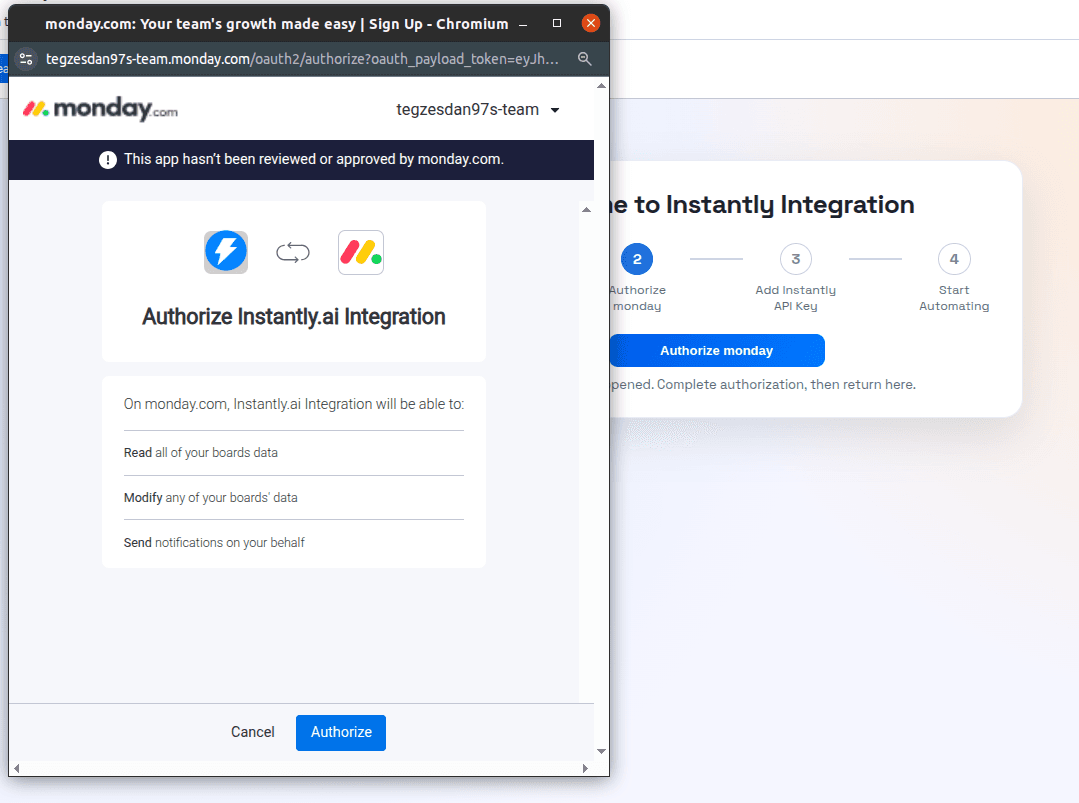
After installing, you land on the Admin UI. Click Authorize monday to open the authorization pop-up, confirm, and you are returned to the Admin UI.
3Connect Instantly.ai With Your API Key
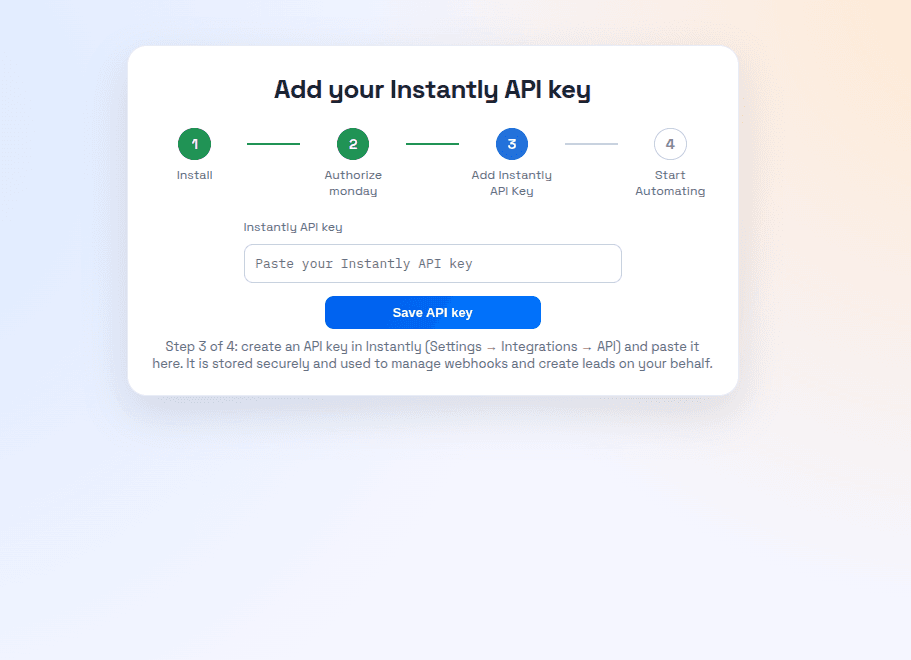
This step differs from most integrations. Instantly.ai connects with an API key rather than a login redirect. Generate the key in your Instantly.ai account first, then bring it back here.
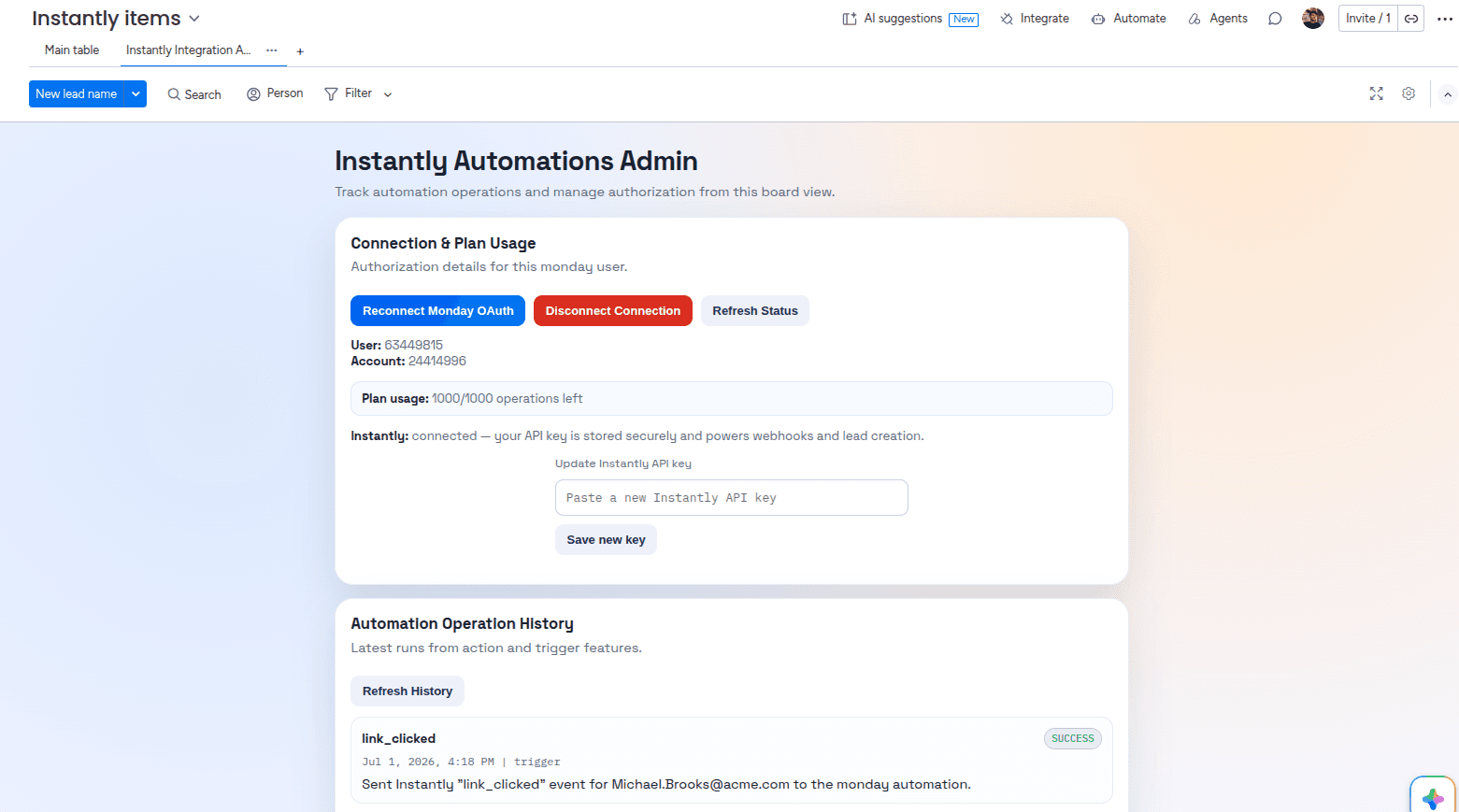
Paste the key into the Admin UI and click Save API key to finish the Instantly.ai authorization. You are then returned to the Admin UI, where you can see your connections, plan usage, and automation operations history.
4Add an Instantly.ai Trigger
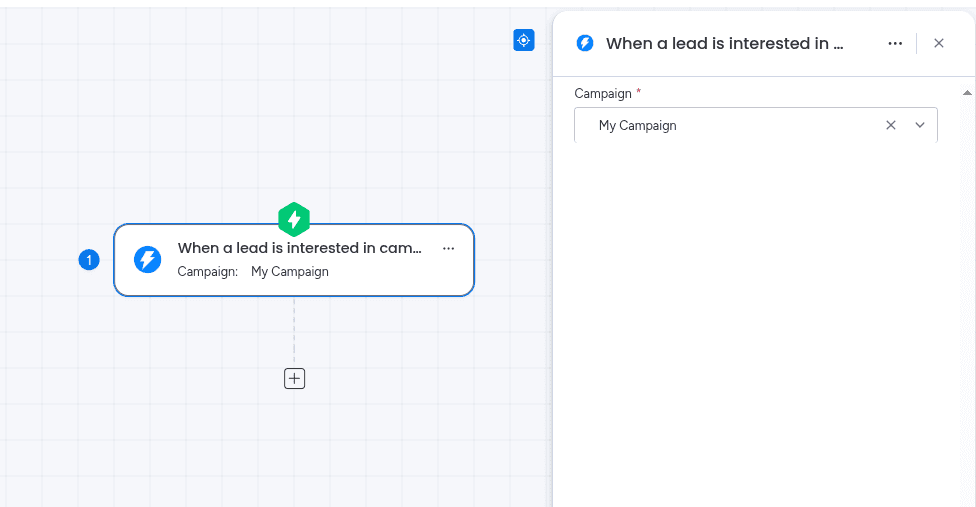
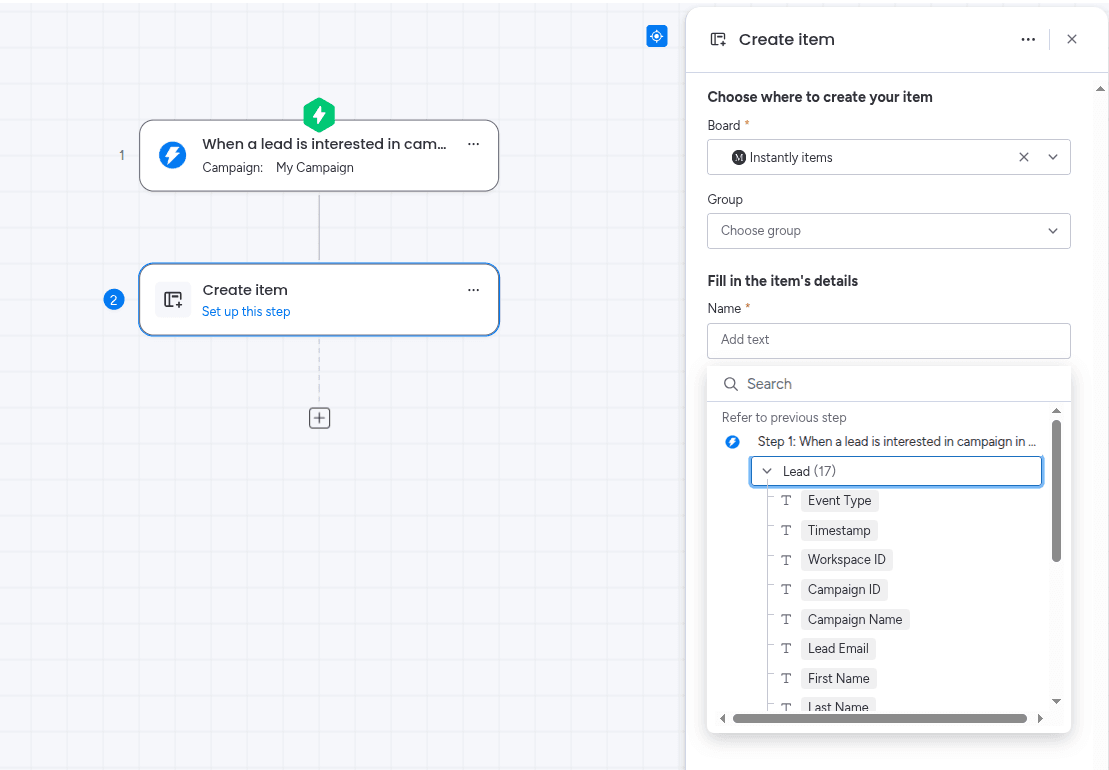
Start a new workflow and search the Triggers section for Instantly. Pick the campaign event you want to watch — for example, when a meeting is booked in a campaign. No extra configuration is needed on the trigger itself.
5Add an Action
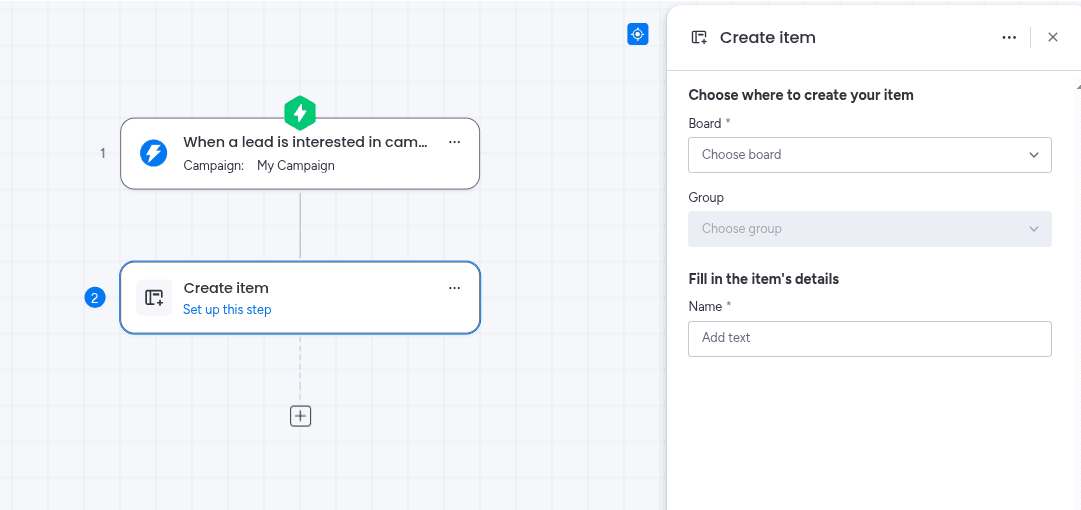
Search the Actions section for the action you want — commonly “Create item” — then choose the board it should write to.
6Map Fields Between Platforms
Map your board columns to Instantly.ai fields. These values populate each item the automation creates.
Example mappings for a booked-meetings board:
| Instantly.ai Field | monday.com Column |
|---|---|
| Lead name | Name column |
| Lead email | Email column |
| Company | Text column |
| Campaign name | Text or Dropdown column |
| Event type | Status column |
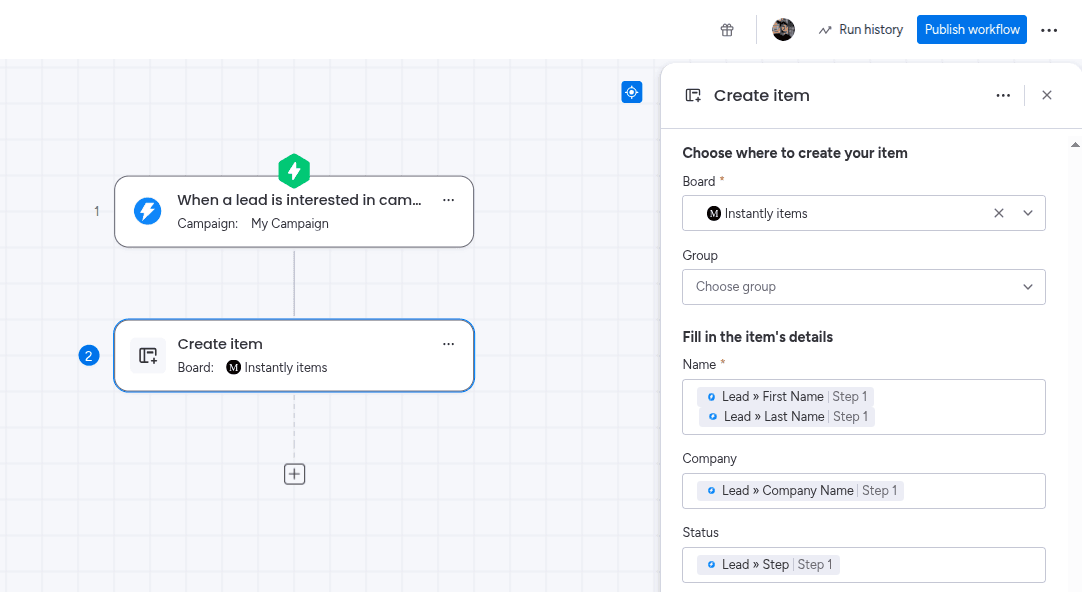
When the mapping is done, click Publish workflow to activate it.
7Test the Integration
- Trigger the event yourself — reply to a test campaign from another address
- Confirm the item appears on your monday.com board
- Check that each mapped column holds the value you expect
Run this against a test board before pointing the automation at a live campaign.
Building the Same Automation From a Board
Workflows are not the only route. You can build the same thing from a board’s Automations section, which is often more convenient when the automation only ever concerns that one board. Open Automate on the board, create an automation from scratch, then add the Instantly.ai trigger and action.
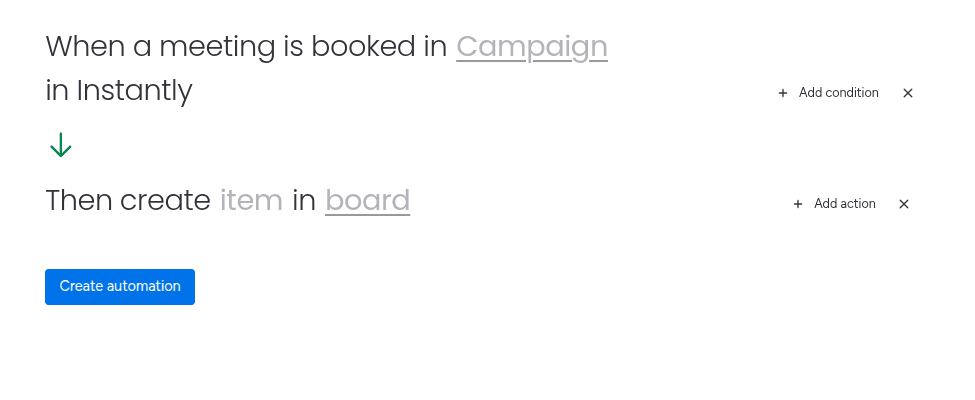
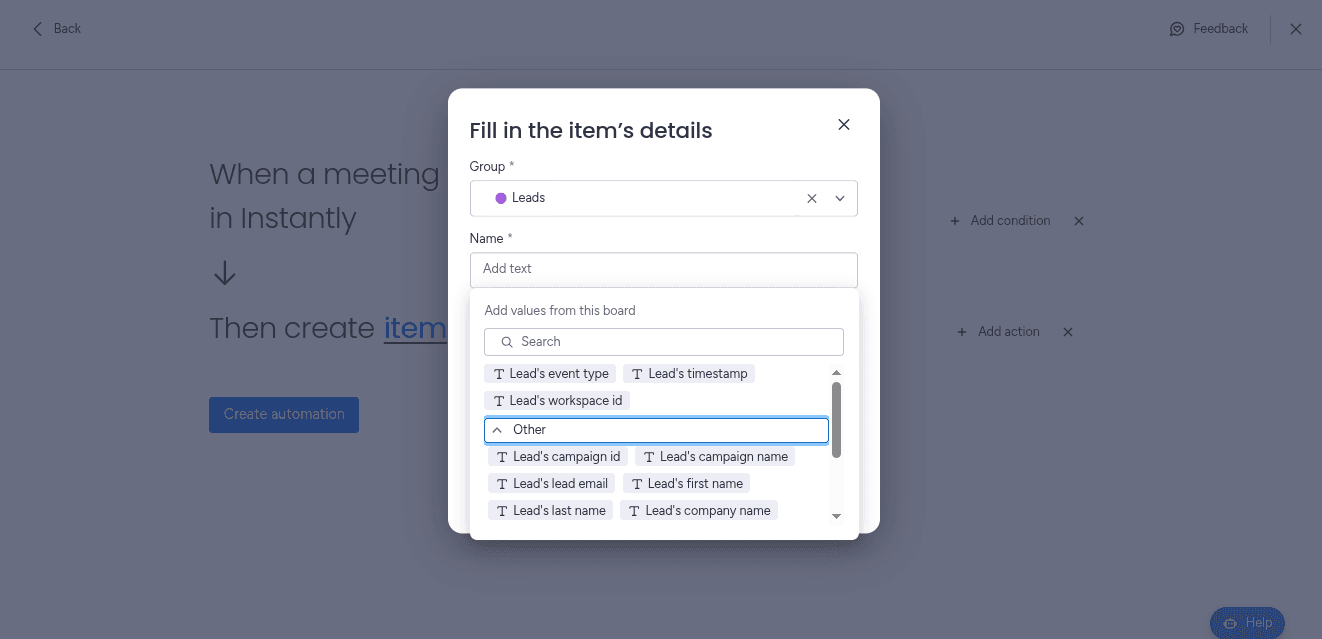
The field mapping works exactly as it does in a workflow. Click Create automation when you are done. The full walkthrough of both routes, plus a video tutorial, is in the Instantly Integration setup guide.
Common Use Cases
Reply to Follow-Up Task
Every reply creates an assigned task with the prospect's details already filled in, so nobody has to watch an inbox.
Meeting Booked Alerts
A booked meeting notifies the account owner immediately and opens a pre-call checklist on the board.
Warm Lead Board
Leads marked interested land on a dedicated board where reps work them in priority order.
Engagement Reporting
Send opens and clicks to a reporting board to track campaign performance beside pipeline results.
The pattern worth copying is routing by intent. Send replies and booked meetings to the board your reps actually work, and send opens and clicks somewhere separate. Both are useful, but only one of them needs a human response today.
Why Not Just Use Zapier?
Zapier and Make can both connect Instantly.ai to monday.com, and for a small campaign they work fine. The trade-offs show up quickly at outreach volume:
- Pricing is task-based, and every open and click is a task
- You maintain and pay for a third platform
- Prospect data travels through an extra system
- Debugging spans three tools instead of one
The task-metering point bites hardest here. A campaign that sends thousands of emails a month produces far more engagement events than a CRM produces records, so a per-task meter turns routine reporting into a line item. Because Instantly Integration runs inside monday.com, there is no per-task meter on it.
Best Practices
To get the most out of your Instantly.ai–monday.com integration:
- Start with replies and booked meetings — the two events that need a human today
- Keep opens and clicks on a separate reporting board so they do not bury real leads
- Store the campaign name on every item so you can compare performance later
- Pair the automation with monday.com notifications so replies reach an owner, not just a board
- Test on a sandbox board before pointing it at a live campaign
Frequently Asked Questions
Does Instantly integrate with monday.com?
Yes. Instantly Integration is the only native monday.com integration for Instantly.ai. It is installed from the monday.com Marketplace and runs inside monday.com, so no middleware is involved.
Do I need Zapier to connect Instantly.ai and monday.com?
No. Every other way of connecting the two platforms routes through a general-purpose automation tool such as Zapier or Make. Instantly Integration connects them directly.
What Instantly.ai activity can I sync to monday.com?
Six campaign events: a lead showing interest, an email open, a link click, a booked meeting, a reply, and a lead marked as closed. Each one can automatically create an item on the monday.com board you choose.
Do I need an Instantly.ai API key?
Yes. Unlike most integrations, Instantly.ai connects with an API key rather than a login redirect. You generate the key in Instantly.ai, paste it into the app's Admin UI, and click Save API key.
Can I create a monday.com item when a prospect books a meeting?
Yes. Use the booked-meeting trigger with a Create item action, and each new meeting becomes a board item that can notify the account owner and assign follow-up automatically.
Should I sync email opens and clicks too?
Only if you want engagement reporting. Opens and clicks are far higher volume than replies and meetings, so most teams send them to a separate reporting board rather than the board reps work from.
Final Thoughts
Automate replies first. It is the event with the shortest useful half-life, and it is the one where cutting the delay from hours to seconds changes the outcome. Once that runs cleanly on a test board, add booked meetings, then interested leads, and leave opens and clicks until you actually want the reporting.
Explore More monday.com Integration Guides
Need to connect other tools with monday.com? Check out our related guides:
Import contacts, accounts, and leads with field mapping and scheduled imports — the other half of an outbound stack.
An overview of CRM, sales, finance, and project-management integrations for monday.com.
Ready to connect Instantly.ai and monday.com?
Install Instantly Integration from the monday.com Marketplace and turn campaign engagement into work your team can act on.
Install Instantly Integration